ChatGPT Dots Explained: OpenAI's Always-On AI Agents, and the Jobs They Change First
September 30, 2026
Executive Intelligence Summary
- 01
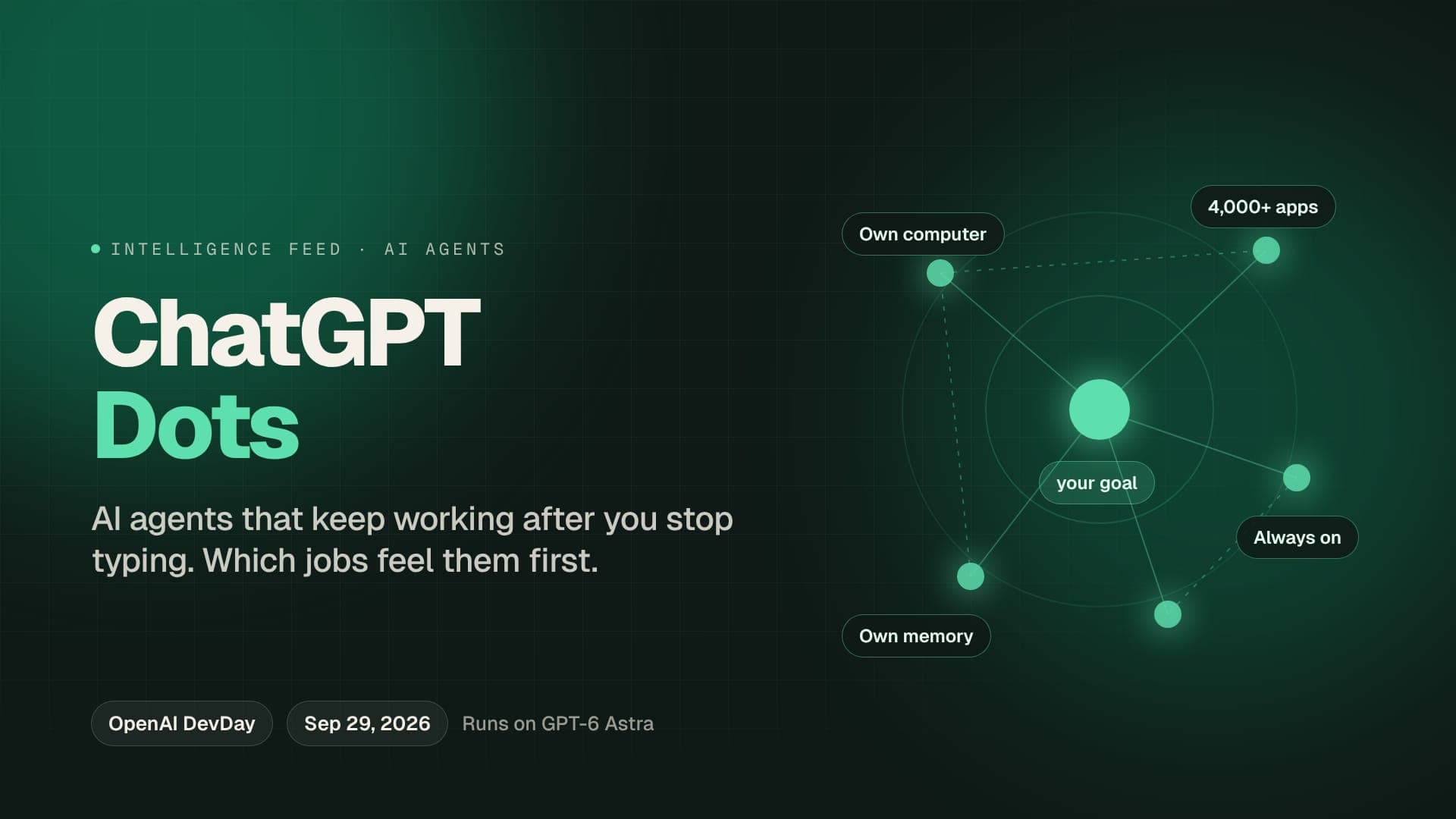
OpenAI launched dots at DevDay on September 29, 2026. A dot is an always-on agent in ChatGPT: you give it a goal and it keeps working after you stop typing, checks in on its own schedule, and messages you when it needs a decision.
- 02
Each dot runs on GPT-6 Astra, has its own cloud computer, keeps its own memory, and can connect to more than 4,000 apps. You can reach it in ChatGPT, on your phone, in Slack or in Microsoft Teams.
- 03
At launch, dots are for ChatGPT Pro and Business Premium users in eligible countries (not the EU, Switzerland or the UK on Pro). Your first dot is included, and chatting with it does not count toward your ChatGPT limits.
- 04
The shift is from a tool you use to a helper that works in the background. Jobs built on follow-ups, scheduling, checking and coordinating - the glue between tasks - feel this first.
On September 29, 2026, at its DevDay conference in San Francisco, OpenAI launched dots - always-on AI agents that live inside ChatGPT.
Here is the simplest way to understand them. A chatbot waits for you. A dot does not. You give it a goal, and it keeps working after you close the app: checking, chasing, booking, fixing. When it needs a decision, it messages you.
That small difference - from a tool you use to a helper that works in the background - is why dots may change more jobs than another smarter model would. This guide explains how dots work, who can get them, what they cost, how safe they are, and which jobs they touch first.
What is a ChatGPT dot?
A dot is an AI agent with four things a normal chat does not have:
- A goal it keeps. You set it once, and the dot works toward it between your conversations.
- Its own computer. Each dot runs on its own cloud computer, so it can browse, use tools and do real work - not just write text.
- Its own memory. It remembers the goal, the apps it is connected to and what it has done so far.
- Its own schedule. It sets its own recurring checks and messages you when it needs your judgment.
Every dot runs on GPT-6 Astra, OpenAI's newest model, and can connect to more than 4,000 apps. You can talk to it in ChatGPT, from your phone, or in Slack and Microsoft Teams.
Chatbot vs dot: what actually changes
| A normal ChatGPT chat | A ChatGPT dot | |
|---|---|---|
| When it works | When you type | All the time, toward a goal you set |
| What it remembers | Your chats | Its goal, memory, computer and app connections, between sessions |
| Computer | None of its own | Its own cloud computer |
| Apps | What you paste in | More than 4,000 connected apps |
| Who starts the next step | You | It does - and messages you when it needs a decision |
| Where you reach it | ChatGPT | ChatGPT, mobile, Slack and Microsoft Teams |
What can a dot do?
OpenAI's own examples are everyday and practical: scheduling, travel, budgeting, debugging and coding. Picture a dot that watches for a cheaper flight and asks you before it rebooks, one that tracks spending against a budget every evening, or one that keeps an eye on a failing test and fixes it overnight.
For companies, OpenAI described specialist dots - agents given one clear responsibility, each with its own identity, login details and system access, like a new team member with a narrow job description.
Who can get dots, and what do they cost?
| Question | Answer at launch |
|---|---|
| Plans | ChatGPT Pro and Business Premium, in eligible markets |
| Not yet available | EU and EEA, Switzerland and the UK (for Pro) |
| Businesses and schools | Enterprise, Edu and Healthcare workspaces get beta access through their admins |
| Price | Your first dot is included in the plan |
| Usage limits | Chatting with a dot does not count toward your ChatGPT limits |
| Age | 18 and over |
The engine: why GPT-6 Astra makes dots useful
An always-on agent is only worth having if it can actually finish the work. That is where GPT-6 Astra comes in.
The engine inside every dot: GPT-6 Astra
Dots run on GPT-6 Astra. OSWorld 2.0 measures how often a model finishes real tasks in real desktop apps - browsers, spreadsheets, forms. Higher is better.
- GPT-6 Astra (OpenAI)
- GPT-5.6 Sol (OpenAI, prior gen)
OSWorld 2.0 task completion
Source: OpenAI GPT-6 Astra launch materials (September 3, 2026), OSWorld V2-Offline.
OSWorld puts a model in front of a real desktop and asks it to complete real tasks - fill in a form, update a spreadsheet, move files between apps. Astra finishes 72.6% of them unattended.
And how fast it gets there
Average minutes per OSWorld task. Lower is better. An agent that works while you sleep, at this speed, gets through a lot of a working day's errands.
- GPT-6 Astra (OpenAI)
- GPT-5.6 Sol (OpenAI, prior gen)
Average time per task
Source: OpenAI GPT-6 Astra launch materials (September 3, 2026), average time per OSWorld task.
It also does them in about 40 minutes on average, against 75 for the previous model. Now combine the two: a model that finishes seven in ten desktop tasks, running all night, every night, without being asked. That is the real product OpenAI launched.
Free · about 30 seconds
A dot works while you sleep. Which of your tasks could it take?
Upload your resume and get your AI Job Security Score, the tasks most at risk and the strengths that protect you.
How safe is it to let a dot act for you?
Giving software your logins is a big step, and OpenAI built in several layers of control:
- Your own computer is off-limits by default. Access to your local machine is optional and starts switched off.
- Background research is read-only. In that mode a dot cannot send messages, change content or control a browser.
- A human must take over for passwords and money transfers. The dot cannot do those alone.
- Actions are reviewed before they run, and you can set custom rules for what a dot may do.
The limits are not perfect, and OpenAI says so: its safeguards reduce risk but do not remove it. In testing reported from the GPT-6 Astra system card, the model respected changed permissions in most - but not all - cases.
Does it stay inside its limits?
In tests where a task's permissions or scope changed halfway through, how often did the model respect the new limits? Higher is better - and the gap to 100% is the reason dots need a human in the loop.
Mid-task permission changes
Source: GPT-6 Astra system card evaluation, as reported in coverage of the dots launch (45 of 49 mid-task permission-change tests respected the intended boundaries).
One more catch: you cannot view or edit a dot's individual memories. The only full reset is to delete the dot, along with its conversations and scheduled tasks.
Why dots matter more than another model launch
Most AI launches make a tool smarter. Dots change who starts the work.
Until now, AI waited for a person to ask. The person did the "glue work" around every task: noticing something needs doing, chasing the reply, checking the result, booking the next step. Dots are designed to do exactly that glue - continuously, in the background, across thousands of apps.
That is why the jobs most exposed are not the most technical ones. They are the jobs where a large part of the day is following up, checking and coordinating.
Which jobs feel dots first?
| Role | What a dot can take over | Exposure |
|---|---|---|
| Executive and personal assistants | Scheduling, travel, inbox follow-ups | Critical |
| Operations and project coordinators | Chasing updates, status checks, reminders | Critical |
| Bookkeeping and budget tracking | Daily spend checks, reconciling numbers | High |
| Junior developers on bug duty | Watching tests, fixing routine failures overnight | High |
| Customer and vendor follow-up roles | Repeat check-ins inside connected apps | High |
| Managers, client leads, decision makers | The decisions a dot must hand back | Lower |
The pattern is simple. If your work is "keep things moving", a dot is built to do it. If your work is "decide where things should go", a dot needs you.
The new skill: managing agents
The people who gain from dots will be the ones who are good at delegating to them:
- Writing a clear goal. "Keep my calendar free on Friday afternoons and book client calls into Tuesday" beats "help with my calendar".
- Setting limits. Deciding what a dot may do alone, and where it must ask.
- Checking the work. Spot-checking what the dot did, and catching the four-in-49 moments.
- Owning the outcome. When a dot books the wrong thing, a person still answers for it.
These are management skills, and they are now worth learning even if you manage no one.
What to do this week
- List your follow-ups. Write down everything you check, chase or book in a normal week. That list is a dot's job description.
- Move toward the decisions. Dots message a person when they need judgment. Aim to be that person, not the follow-up the dot replaced.
- Practise delegating. Try an agent on one repeating errand, write the goal carefully, and check what it did.
- Know your exposure. See which of your tasks are most at risk, and build a plan around the strengths that protect you.
Your 6-month plan
Get a 6-month plan built for the agent era
Answer 12 short questions. We research your job market live and write a plan for you, month by month.
Dots will not be the last always-on agent; they are the first one most people will meet. The question for your career is not whether agents arrive at work - it is whether you are the one directing them.
Applying is 12 minutes of typing you've already done.
Job Autofill fills every application from your saved profile - about 10 hours back over a job hunt.
Professional Defense Strategy
6-Month Strategic Action Plan
List the follow-ups you do every week: chasing replies, checking a dashboard, booking things, reconciling numbers. These repeat-and-check tasks are exactly what a dot is built to take over.
Learn to delegate in writing. A dot is only as good as the goal it is given; people who can write a clear goal, set limits and check the result become the ones who run agents rather than compete with them.
Own the parts a dot must hand back. OpenAI requires a human to step in for passwords and money transfers, and dots message a person when they need judgment. Make sure that person is you.
Check how much of your role is glue work. A free AI Job Security Score shows which of your tasks are most exposed to agents like dots.
Frequently Asked Questions
What are ChatGPT dots?
Dots are always-on AI agents inside ChatGPT, launched by OpenAI on September 29, 2026. You give a dot a goal and it keeps working on it after you stop typing. It has its own cloud computer and memory, can connect to more than 4,000 apps, schedules its own check-ins, and messages you when it needs a decision.
How much do ChatGPT dots cost?
At launch, your first dot is included with a ChatGPT Pro or Business Premium subscription. Conversations with a dot do not count toward your normal ChatGPT usage limits. You must be 18 or over to use one.
Who can use dots, and are they available in the UK or EU?
Dots launched for ChatGPT Pro and Business Premium users in eligible markets. The Pro launch excludes the European Economic Area, Switzerland and the United Kingdom. Enterprise, Edu and Healthcare workspaces can get beta access through their administrators.
What AI model do dots use?
Each dot runs on GPT-6 Astra, the model OpenAI released on September 3, 2026. Astra completes 72.6% of tasks on OSWorld 2.0, a test of real work in desktop apps, and takes about 40 minutes per task on average against 75 for the previous model.
What can a ChatGPT dot do?
OpenAI's own examples include scheduling, travel, budgeting, debugging and coding. Businesses can also set up specialist dots that take on a defined responsibility, with their own identity, credentials and system access. You can message a dot from ChatGPT, your phone, Slack or Microsoft Teams.
Is it safe to give a dot access to my apps?
OpenAI built in layers of control: access to your own computer is optional and starts switched off, background research is read-only, a human must take over for passwords and money transfers, actions are reviewed before they run, and you can set custom rules. OpenAI itself says these safeguards reduce risk but do not remove it. One limitation: you cannot view or edit a dot's individual memories - the only full reset is deleting the dot.
How is a dot different from a normal ChatGPT chat?
A normal chat answers when you type and stops when you stop. A dot keeps a goal, a computer, a memory and its app connections between sessions, works in the background, checks in on its own schedule, and comes back to you only when it needs a decision.
Will ChatGPT dots replace assistants and coordinators?
Dots take over tasks, not whole jobs - but the tasks they target are the core of some roles: scheduling, travel booking, chasing follow-ups, tracking budgets and checking on routine work. People in assistant, coordinator and operations roles are most exposed. The protection is moving toward the decisions a dot has to hand back to a person, and toward running agents rather than doing what they do.
Researcher Intelligence
Automation Intensity
96%Overall Substitution Risk
Grounding
Primary Technical Launch
Status
Market Active
"Market saturation for Agentic intelligence is expected to accelerate significantly following this window."
Land Your First Interview Call Faster.
In the middle of job loss chaos, don't get lost in the pile. Resume Maximiser scores your resume in 30 seconds and shows you exactly why it is being filtered out.